Dedicated software
project estimation tool

Organize your project with a dedicated tool featuring hierarchical groups, role-based tasks and real-time time analytics

Why use a dedicated tool for software estimates?

Start free for 14 days

Ready-made estimation structure

Project managers waste hours fixing spreadsheet formatting and indentation. devtimate provides a ready-made structure designed for software estimation. You simply add groups and tasks, and the tool handles the visual hierarchy, numbering, and summarization automatically.

Reusable estimation logic

Don't reinvent the wheel for every login screen. Save your well-structured groups and tasks as templates. In your next estimate, you can drag-and-drop these pre-validated structures into place, ensuring every project uses your company's best practices.

Role-based clarity

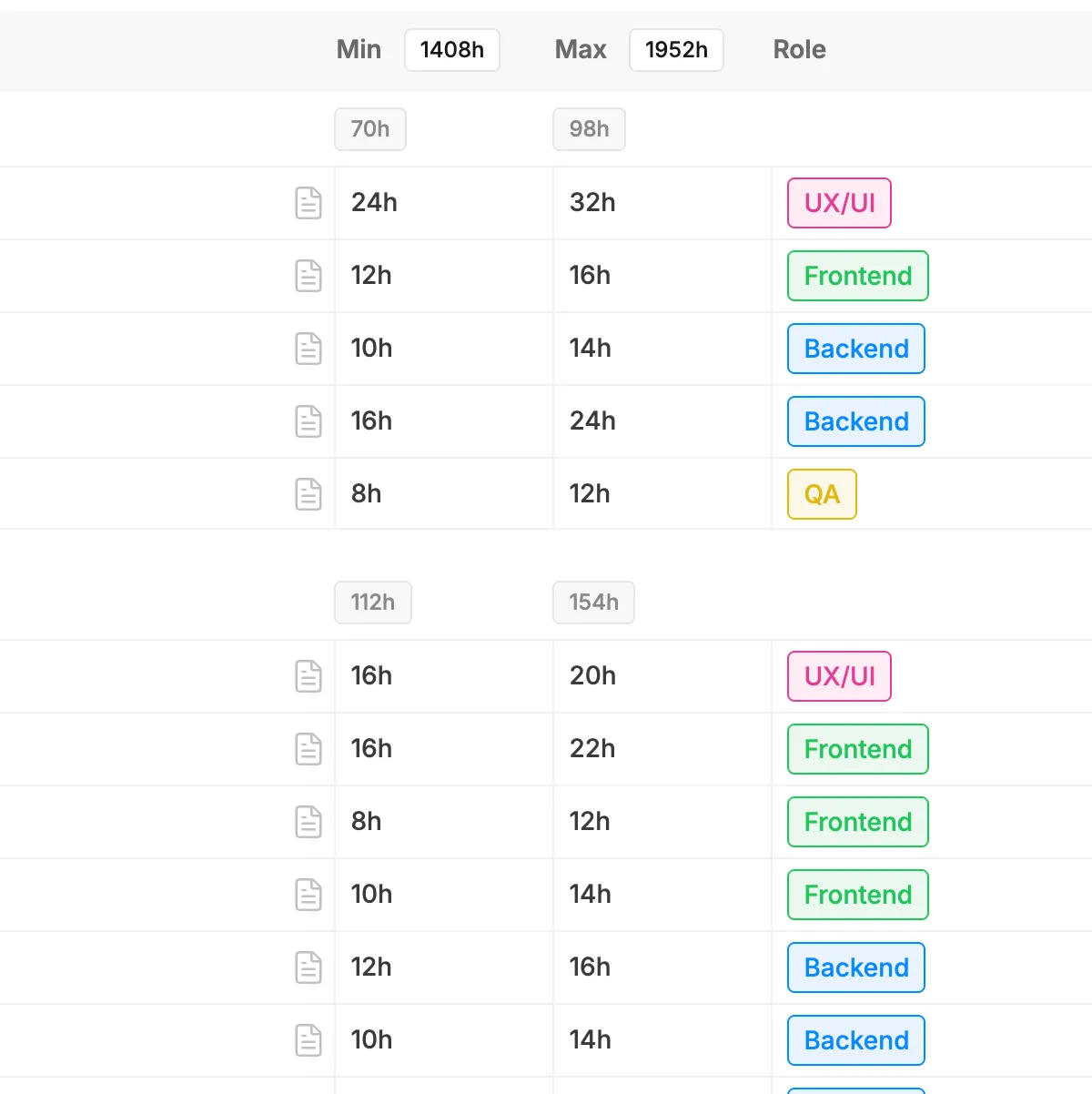
Our structure inherently links scope to resources. Because every task in the hierarchy is assigned a specific role, you get an instant breakdown of necessary team composition. You can see immediately if a module is heavy on backend work or requires extra QA, allowing for better resource planning before the deal is signed.

Organized estimation workspace

Eliminate the chaos of scattered spreadsheet files and version control issues. Our tool offers a dedicated environment where every project follows a consistent structural standard. This ensures that any team member can open an estimate and immediately understand the hierarchy.

Sparkles

Comprehensive features for software estimates

Hierarchical groups & tasks

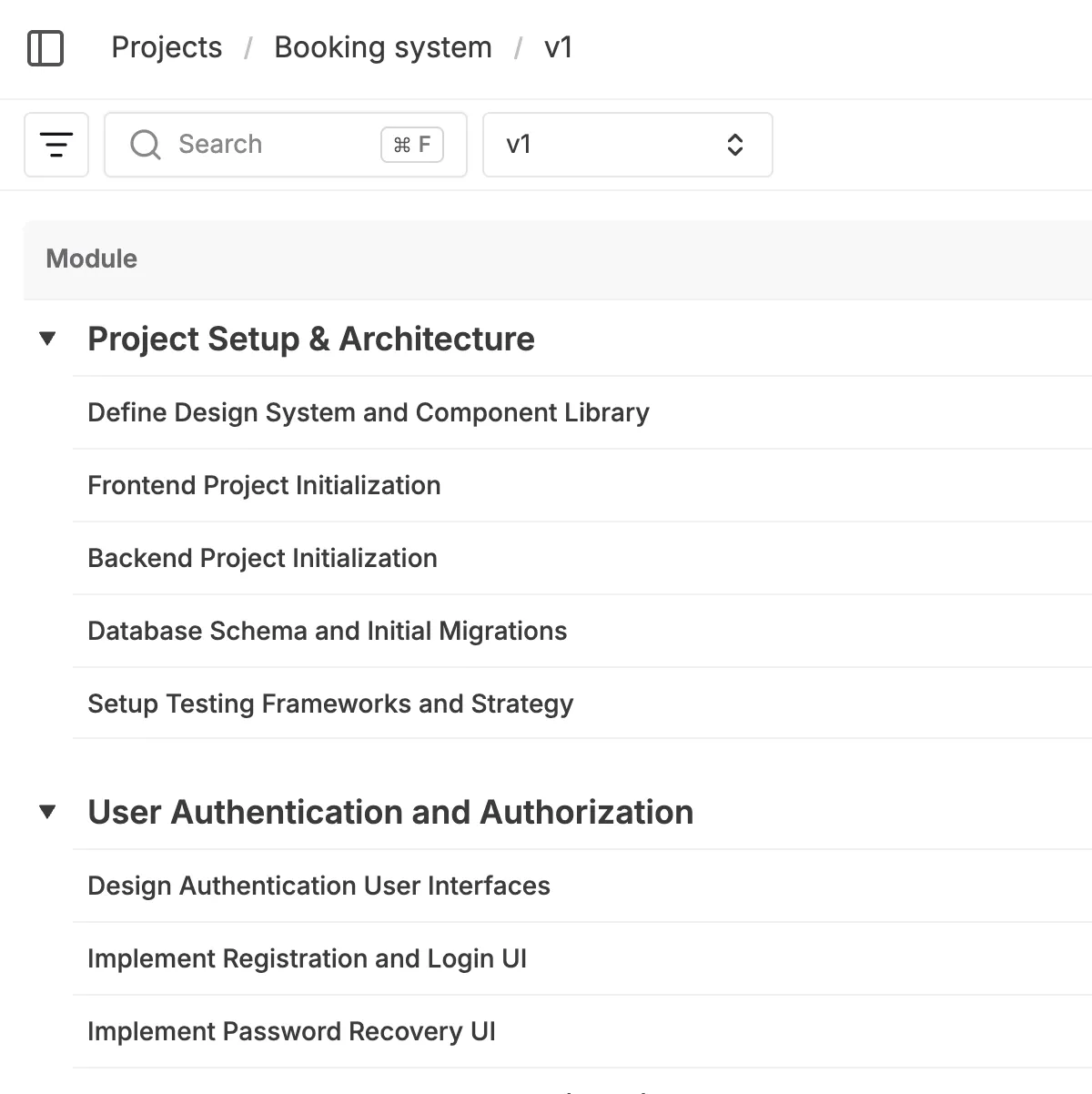
Build your estimate using a logical "tree" structure of groups (modules) and tasks. You can nest groups within other groups to create a deep, clear hierarchy that perfectly matches your application's architecture or feature breakdown. This allows you to organize complex projects into manageable sections, from high-level phases down to granular tickets.

Easy to use

Flexible structure

Nest like you want

Easy for eye scan

Hierarchical groups & tasks

Visibility toggles

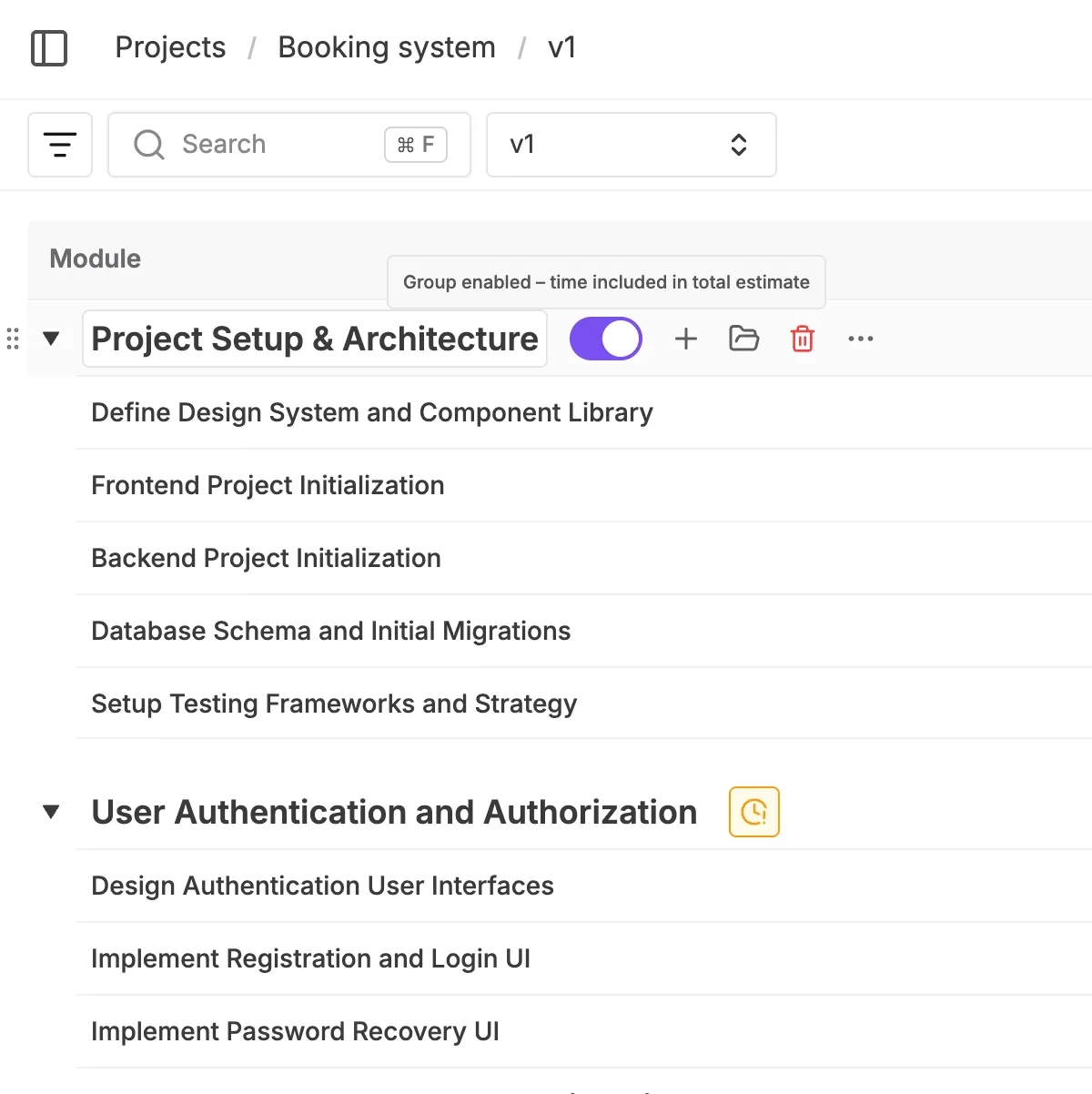
Every group and task includes a visibility toggle that allows you to "turn off" items without deleting them. When an item is toggled off, it remains visible to your team but is instantly excluded from all time and cost calculations. This is perfect for planning "nice-to-have" scenarios or optional features that you want to keep in the file but exclude from the current budget total.

1

Quickly toggle items on and off

2

Instant impact on totals

3

See the impact in real time

Visibility toggles

Role-based estimation

Assign specific roles like Backend Developer, QA, or DevOps to every task instead of assigning specific people. Each role is fully customizable to match your agency's structure, allowing you to define distinct hourly rates for every specialist type involved in the project. This ensures your cost calculations reflect the actual resource value required for delivery.

Custom role definitions

Define specific roles like "Senior Backend" or "UX Lead" to match your agency's structure

Resource breakdown

Instantly view the total hours allocated to each role to plan your team capacity effectively

Role-based estimation

Flexible time units & ranges

Choose how you want to estimate. You can toggle the entire project view to work in hours or man-days (MD) depending on client preference. Furthermore, you can estimate every task using min-max ranges (optimistic and pessimistic values). This allows you to account for uncertainty and risk directly in the estimation line, rather than applying a generic buffer at the end.

Hours or man-days

Toggle the entire project view between hours and man-days to match your client's preferred format

Risk buffers

Define optimistic and pessimistic ranges for every task to account for technical uncertainty

Flexible time units & ranges

Custom columns & data

Tailor the estimation grid to fit your specific process by adding custom columns. You can insert "Select" lists for complexity levels, "Short Text" fields for internal notes, "Tags" for categorization, or "Formulas" to implement custom logic directly in the grid. This allows you to capture all necessary project context right alongside the cost estimates.

1

Custom logic & formulas

Implement your own math directly in the grid. Create formulas to automate specific calculations, like adding a percentage-based QA buffer or calculating risk ratios based on values from other columns.

2

Visual categorization

Go beyond simple numbers by adding context to every row. Use visual tags, status dropdowns, and text notes to clarify complexity levels, assign priorities, or leave instructions for your team.

Custom columns & data

Real-time breakdowns

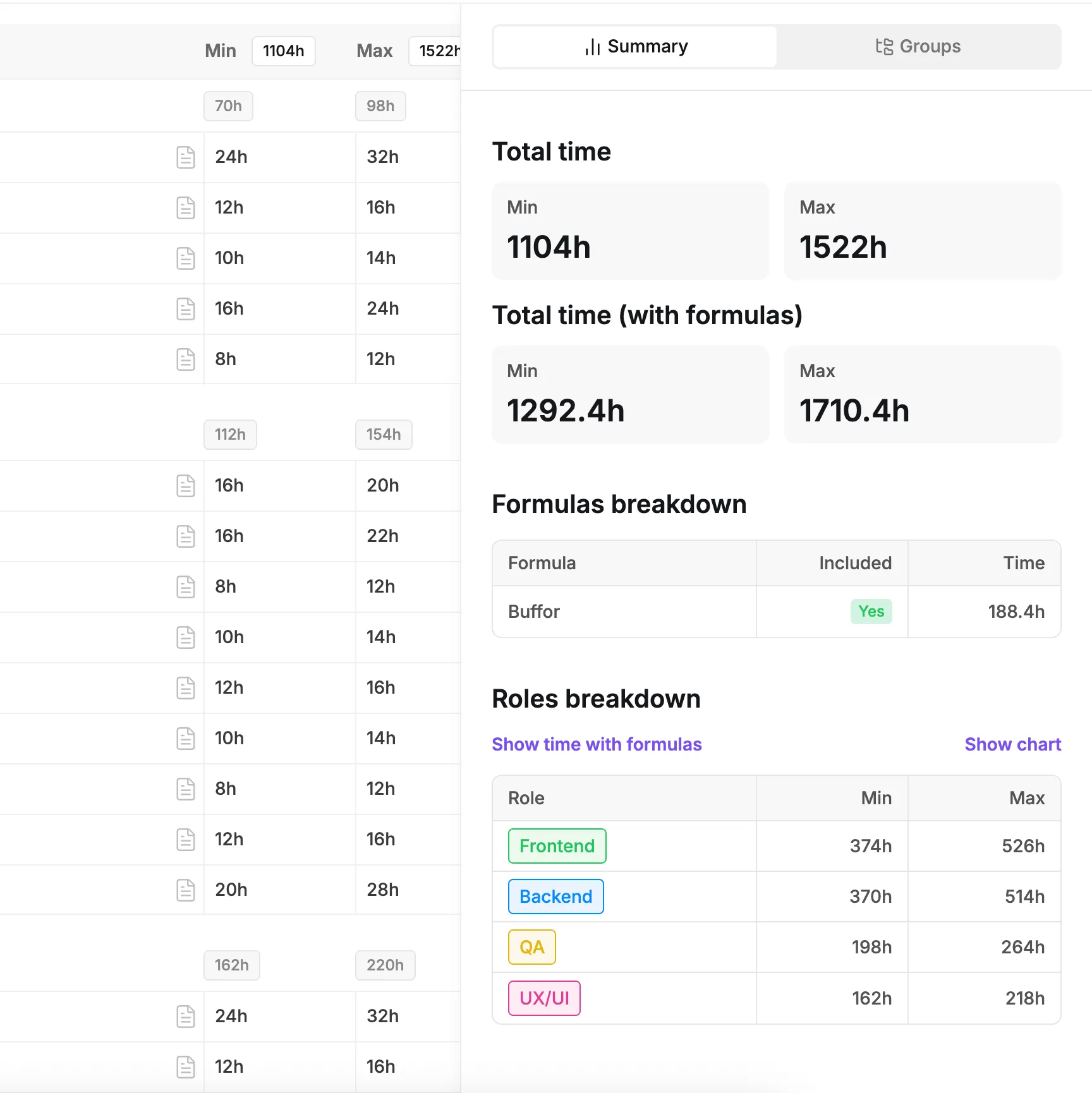
Forget about manually updating pivot tables; the tool provides automatic summaries that update as you type. You get instant visibility into total hours and costs for the whole project, specific module subtotals, and a dedicated breakdown by role that shows exactly how many hours are allocated to each specialist type.

Instant group subtotals

Automatically calculate time subtotals for every group and nested module

Risk buffers

Track the grand total cost and hours in real-time with every single edit

Real-time breakdowns

Why spreadsheets fail
at software estimation

Start free for 14 days

Spreadsheets are error-prone and fragile

Excel relies on manual formulas that break easily. Moving a row or inserting a column can disconnect your totals, leading to calculation errors that might cost you money or credibility.

Manual data entry is unorganized

Managing estimates in files leads to version chaos. Spreadsheets scatter your data, making it impossible to standardize how different project managers structure their scopes or where they save their files.

Unintuitive for complex scoping

Spreadsheets are not designed for the nested nature of software projects. They lack built-in features like visibility toggles, role-based rate calculations, and drag-and-drop reordering, making the process of building a detailed scope slow and frustrating.

Pricing for software
project
estimation tool

Try it free for 14 days. No credit card required. Early adopter pricing available.

Join as an
early adopter!

Get special early adopter pricing and direct support from our team. We work closely with early users, gather feedback, and iterate quickly so you shape the product while it grows and expands.

14 DAYS FREE TRIAL

TRIAL

for 14 days

What's included

Unlimited users and estimates

Reusable templates and library

Unlimited AI-Powered Estimates

Export to external tools

Branded proposals

Access to AI Agent

Priority Support

Try it now!

PRO

$80

per month

What's included

Unlimited users and estimates

Reusable templates and library

Unlimited AI-Powered Estimates

Export to external tools

Branded proposals

Access to AI Agent

Priority Support

Go Pro!

Software project estimation
resources & guides

Complete software project estimation tool

Complete software project estimation tool

Explore all devtimate features - AI estimation, templates, proposals, integrations, and team collaboration tools.

Estimation resources & guides

Estimation resources & guides

Best practices for software estimation, AI tools tutorials, and project scoping guides.

AI-generated estimates

AI-generated estimates

Start with AI-created estimates from requirements. Upload documents, get complete software project estimate in minutes

checkbox doodle

FAQ for software estimation tool

No. devtimate is a dedicated software project estimation tool. You build the estimate here to win the deal, and then export the data to tools like Jira or Asana for delivery.

Yes. You can fully customize roles to match your company's structure (e.g., Senior Dev, Junior QA, UI Designer)

The tool automatically sums up the minimum hours and maximum hours separately. This gives you a realistic range for the total project effort, which helps in setting safe buffers for the final proposal.

When you toggle a group or task off, it is visually dimmed and its hours are excluded from the total project calculation. This allows you to keep "nice-to-have" features in the file without inflating the core budget.

Yes. Once your structure is finalized, you can export the tasks and groups directly to Jira, Asana, or Excel, maintaining the hierarchy you created.

Let's talk!

If you have any questions, contact us.

We usually reply within the same day
or the next business day. Thank you!

Dashboard
background image background image

Start estimating today!

Leave the spreadsheets behind. Build clear, structured,
and accurate software estimates in minutes

Try it now!