Export software estimates to
project management tools

Push approved scopes directly to Jira, Asana, or Excel. Transform your estimate into an actionable backlog in seconds without manual data entry.

Why integrate your estimate
with delivery platforms?

Start free for 14 days

Eliminate manual data entry errors

Transferring data manually creates risk. A simple copy-paste error can lead to missed requirements or budget overruns. devtimate’s software estimate integrations ensure that the exact scope approved by the client is the exact scope your team delivers.

Bridge the gap between sales and delivery

Smooth handoffs are critical for software agencies. Sales teams generate quotes in devtimate, and Project Managers receive structured backlogs in Jira or Asana instantly. Move from "signed proposal" to "sprint planning" without friction.

Flexible export scopes

You don’t have to export everything at once. Select specific modules, individual tasks, or the entire project scope. Whether you are phasing a project or handing off a single feature, you control exactly what data moves to your PM tool.

Dedicated estimation workspace

Project management tools lack the specialized features needed for accurate estimates. devtimate fills this gap with min-max time ranges and role-based cost calculations. Build a profitable commercial scope in a dedicated workspace, then export tasks for execution.

Sparkles

Turn software estimates into active backlogs

One-click integration setup

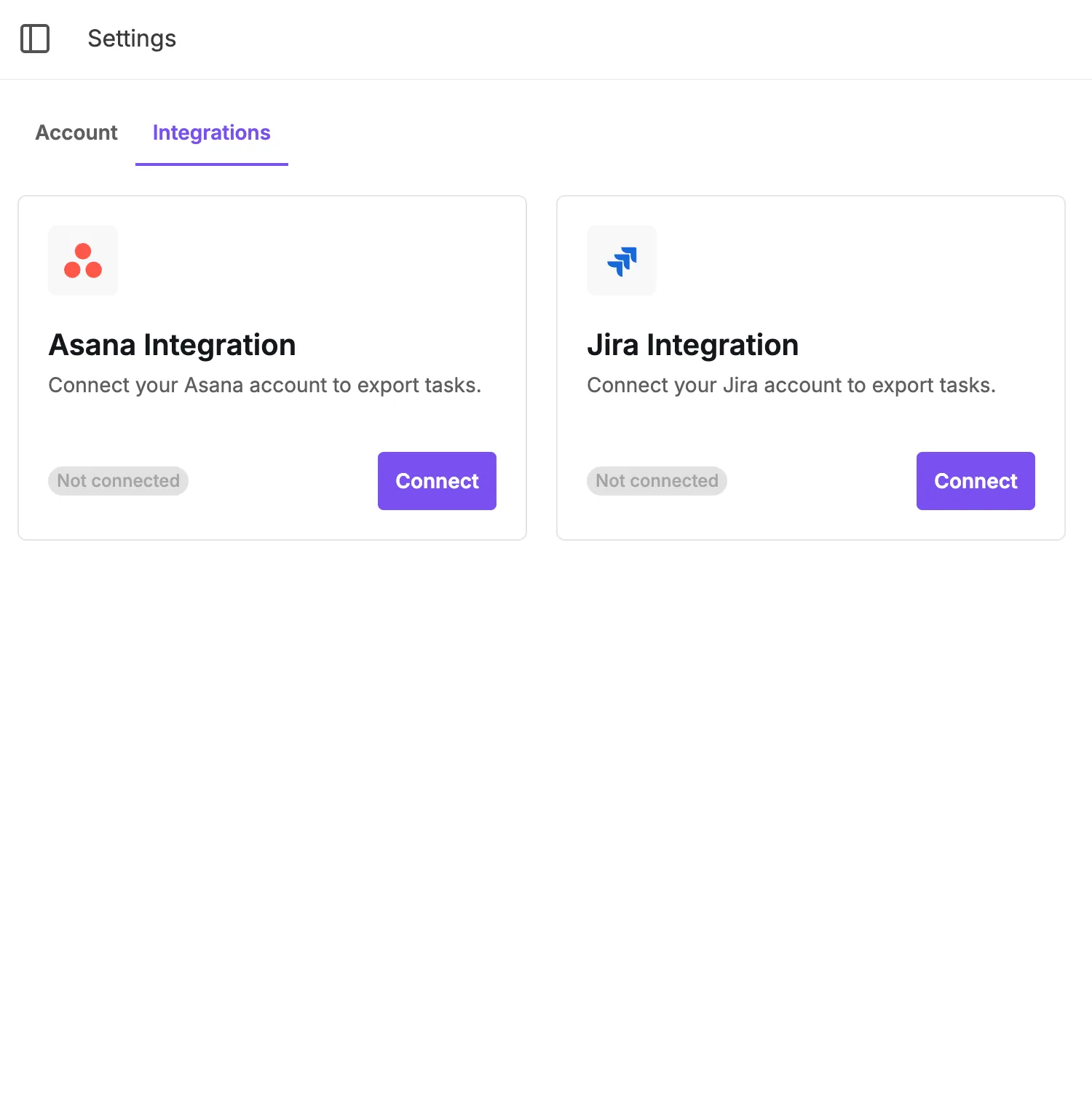
Start by connecting your ecosystem in seconds. Simply click "Connect" for Jira or Asana. This one-time authentication links your devtimate workspace to your delivery tools, enabling instant data transfer without complex API configuration.

Current integrations

Don’t see your integration?
Contact us - we’ll add it!

One-click integration setup

Granular scope selection

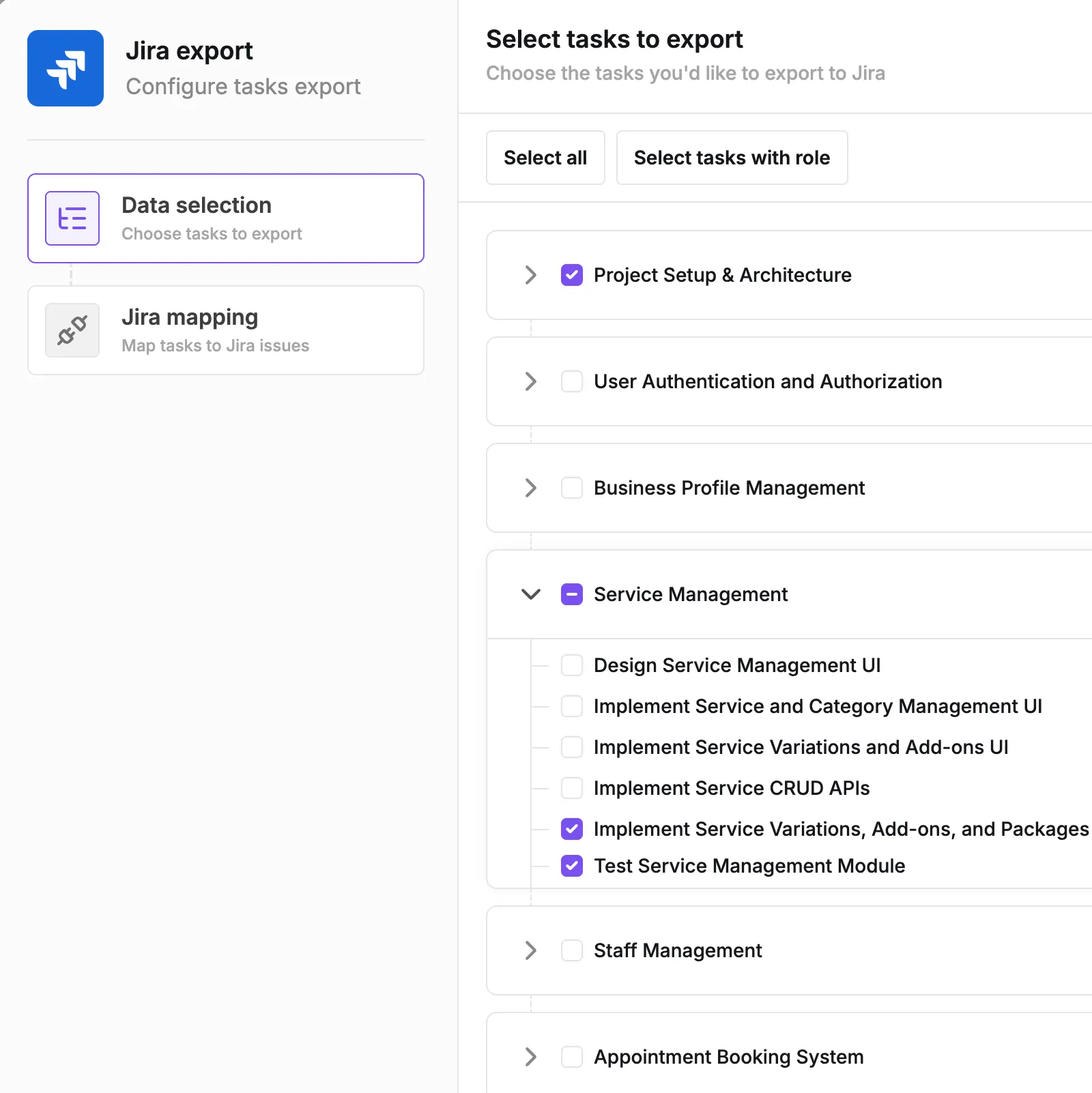
You control exactly what data moves to your project management tool. Press "Export" and choose whether to push - a single task, a specific module, or the entire estimate at once. This flexibility allows you to export phased projects or specific sprints without cluttering your backlog with unapproved scope.

1

Scope selection

2

Full control

3

No clutter

Granular scope selection

Smart hierarchy mapping

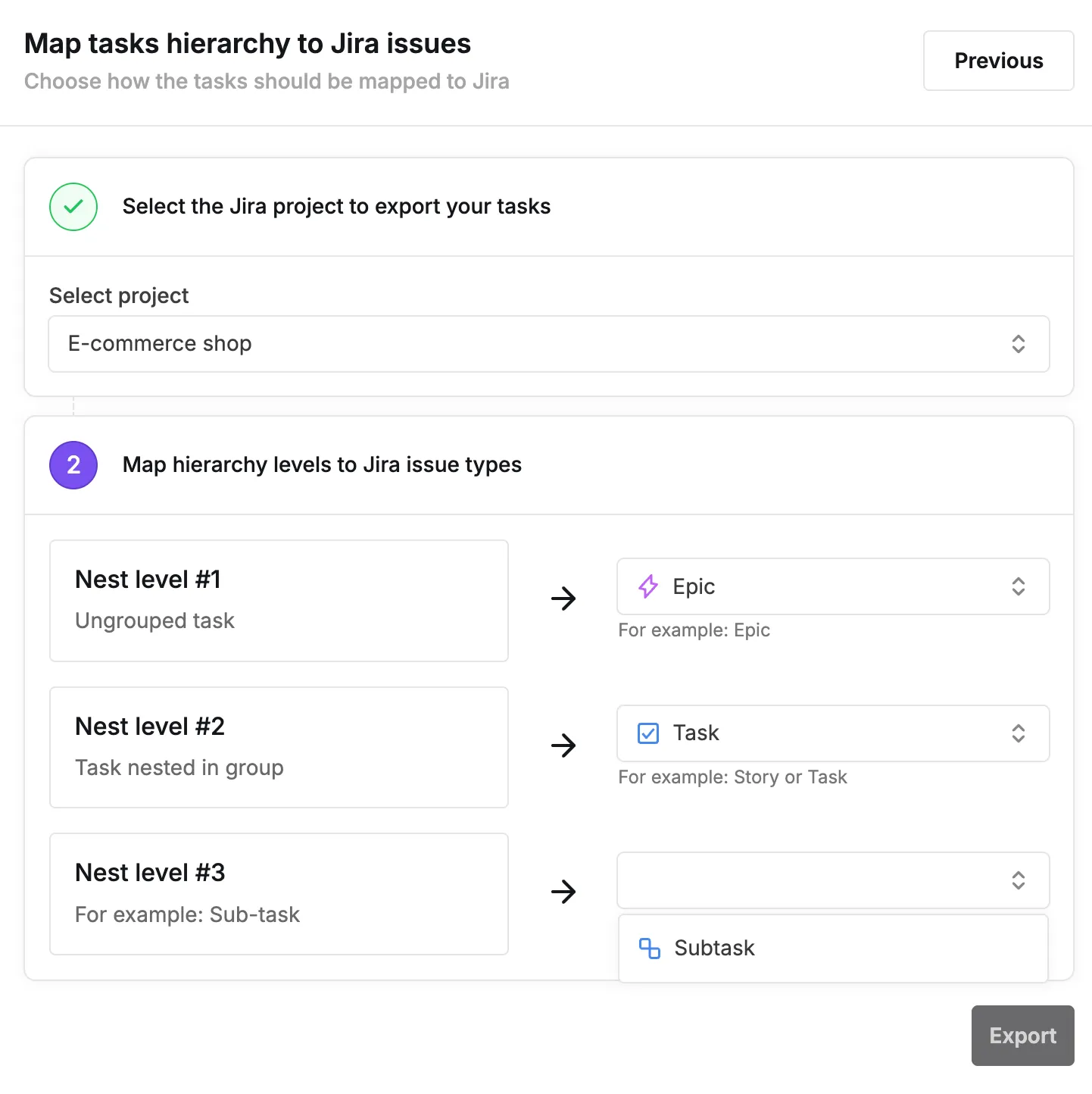
Automatically align your estimate structure with your delivery tools to ensure perfect data transfer. Map devtimate groups to Jira Epics and tasks to Stories, or direct modules to specific Asana sections while preserving all descriptions, roles, and time estimates.

Mapping

Map devtimate data to your delivery tools to ensure perfect data transfer.

Preserve details

Preserve needed data, task names and descriptions are preserved.

Smart hierarchy mapping

Versatile Excel export formats

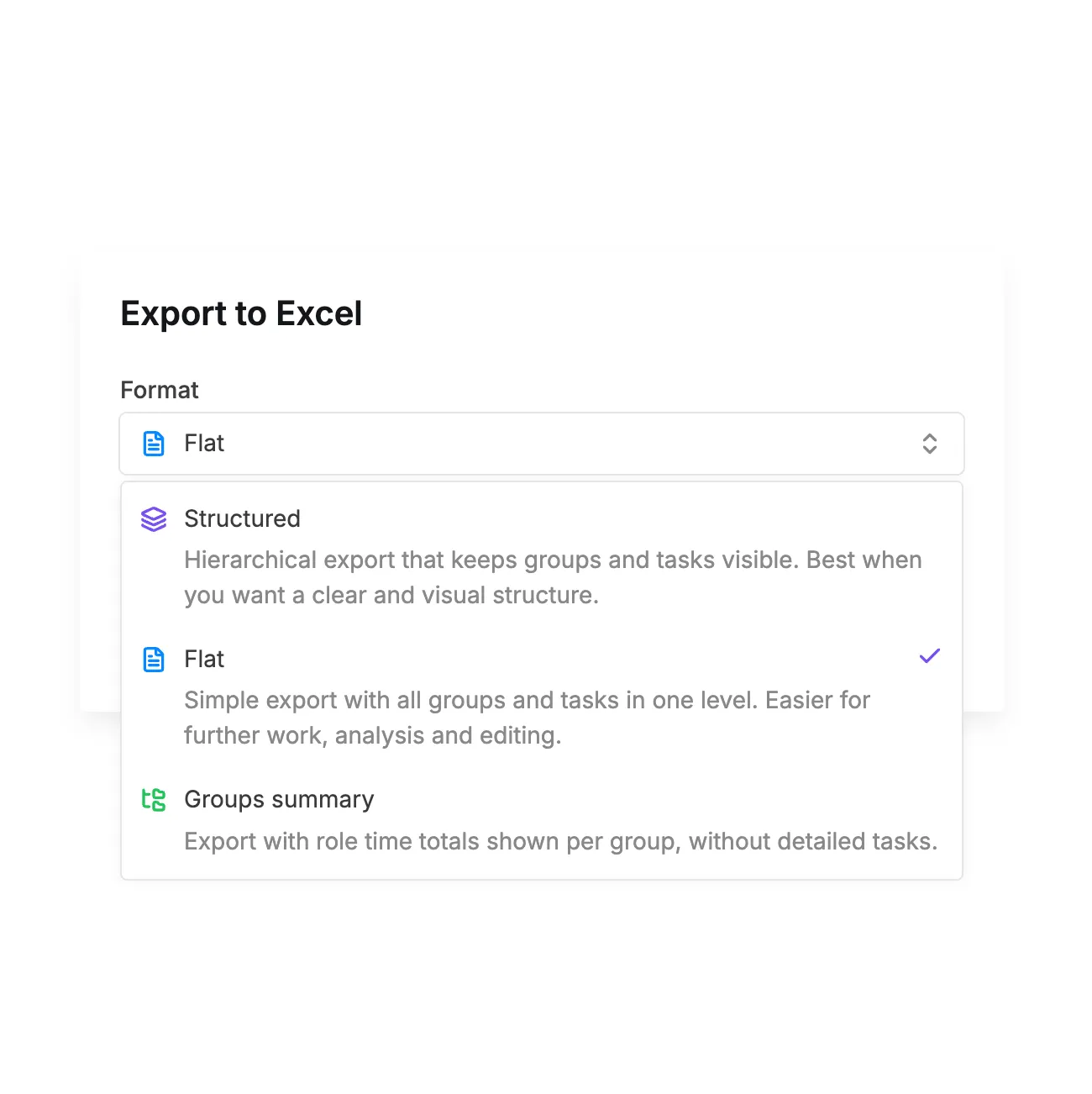
Generate spreadsheets for any reporting need with three distinct export types. Choose from a high-level Groups Summary for costs, a raw Flat Export for data processing, or a Structured Export that visually mirrors your estimate hierarchy.

1

Structured export

Hierarchical export that keeps groups and tasks visible. Best when you want a clear and visual structure.

2

Flat export

Simple export with all groups and tasks in one level. Easier to further work, analysis and editing.

3

Groups summary

Export with role time totals shown per group, without detailed tasks.

Versatile Excel export formats

Manual project setup
creates delivery risks

Start free for 14 days

The "Copy-Paste" bottleneck

Most teams waste valuable hours manually re-typing approved estimates into Jira or Asana. This repetitive administrative work ties up Project Managers and reduces the time available for actual project kickoff and team alignment.

Loss of data integrity

Human error is inevitable during manual data entry. Descriptions get cut off, time estimates are mistyped, and critical acceptance criteria are often missed. This leads to a dangerous gap between what was sold to the client and what ends up in the development backlog.

Disconnected project context

Moving data manually often flattens the project structure. The logic behind module groupings and task dependencies is lost when moving from a spreadsheet to a PM tool. Developers receive a list of tasks without the structural context needed to understand the bigger picture.

Pricing for software
project
estimation tool

Try it free for 14 days. No credit card required. Early adopter pricing available.

Join as an
early adopter!

Get special early adopter pricing and direct support from our team. We work closely with early users, gather feedback, and iterate quickly so you shape the product while it grows and expands.

14 DAYS FREE TRIAL

TRIAL

for 14 days

What's included

Unlimited users and estimates

Reusable templates and library

Unlimited AI-Powered Estimates

Export to external tools

Branded proposals

Access to AI Agent

Priority Support

Try it now!

PRO

$80

per month

What's included

Unlimited users and estimates

Reusable templates and library

Unlimited AI-Powered Estimates

Export to external tools

Branded proposals

Access to AI Agent

Priority Support

Go Pro!

Software project estimation
resources & guides

Complete software project estimation tool

Complete software project estimation tool

Explore all devtimate features - AI estimation, templates, proposals, integrations, and team collaboration tools.

Estimation resources & guides

Estimation resources & guides

Best practices for software estimation, AI tools tutorials, and project scoping guides.

AI Agent for estimates

AI Agent for estimates

Modify software project estimates with prompts. Tweak, generate, add, remove and change estimates by writing.

checkbox doodle

FAQ for
integrations feature

Yes. You can select specific tasks, groups of tasks, or entire modules to export. This is perfect for phased projects where you only want to set up the first sprint or milestone in your project management tool.

Yes. The "Structured" Excel export provides a visual hierarchy that is easy to read. However, for the best client experience, we recommend using our Proposal Generation feature to create branded PDFs.

devtimate preserves your project structure during the transfer. For Jira, you can map Groups to Epics and Tasks to Stories or Tasks. In Asana, your estimate modules are automatically converted into Sections, keeping your backlog organized exactly like your quote.

Absolutely. During the export process, you select the specific Jira project or Asana workspace and project where the data should go. This ensures tasks land directly in the correct active backlog or sprint board.

Let's talk!

If you have any questions, contact us.

We usually reply within the same day
or the next business day. Thank you!

Dashboard
background image background image

Start using integrations today!

Stop manual data entry. Push approved tasks, roles, and hours directly
to Jira, Asana, or Excel and launch your project in seconds.

Try it now!